
Collapsible click ranking instructions (#5 & #6):
For both of these questions the instructions are same to add the below styles in the question itself. The question is programmed like a general multi question and “_order” question is mandatory here.
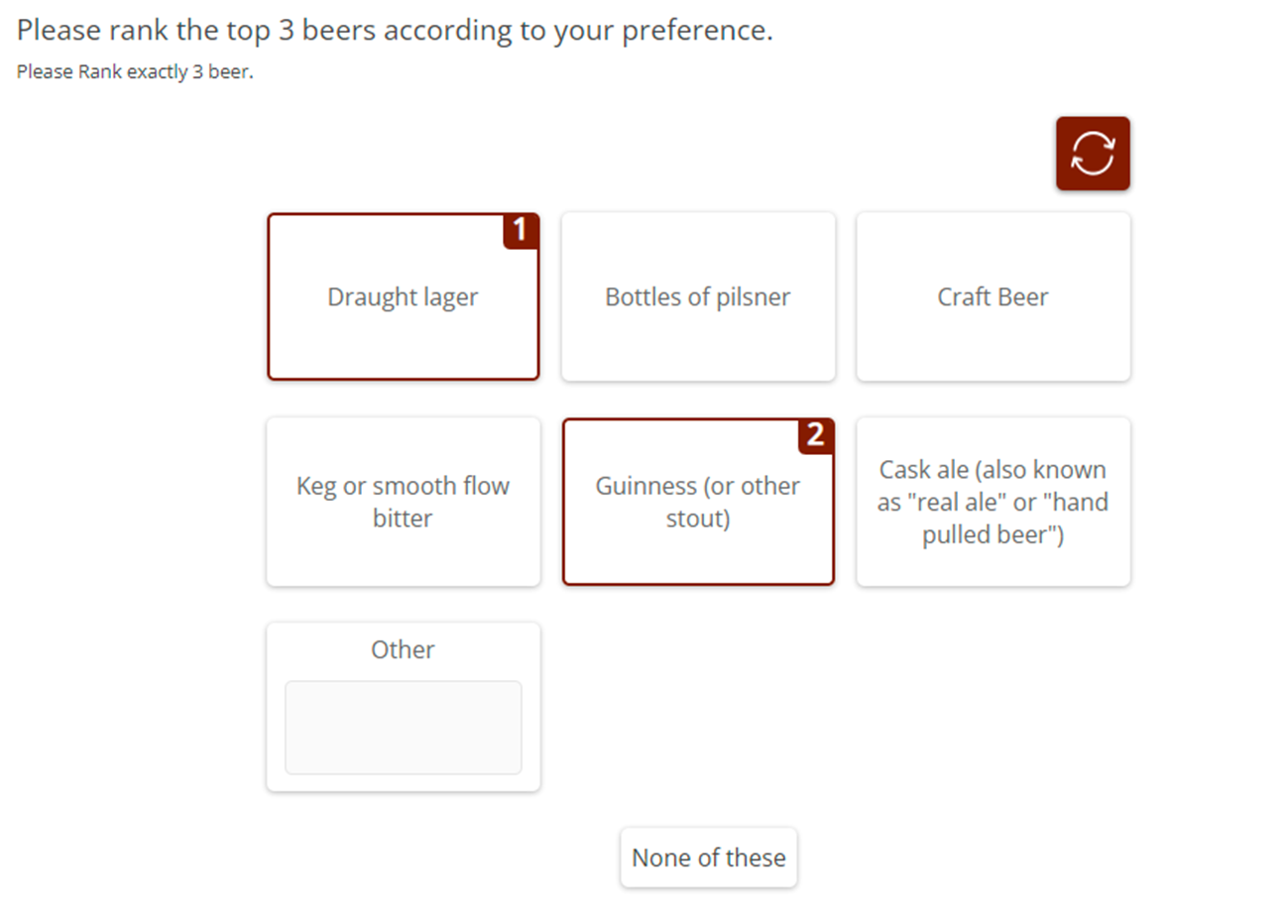
<checkbox
label="collapsibleRanking"
atleast="1"
atmost="3"
fir="off"
shuffle="rows">
<title>Please rank the top 3 beers according to your preference.</title>
<comment>Please Rank exactly 3 beer.</comment>
<group label="g1" builder:axis="row" builder:default="1"> </group>
<row label="r1" groups="g1">Draught lager</row>
<row label="r2" groups="g1">Bottles of pilsner</row>
<row label="r3" groups="g1">Keg or smooth flow bitter</row>
<row label="r4" groups="g1">Cask ale (also known as "real ale" or "hand pulled beer")</row>
<row label="r5" groups="g1">Guinness (or other stout)</row>
<row label="r6" groups="g1">Craft Beer</row>
<row label="r7" groups="g1" open="1" openOptional="1" openSize="25" randomize="0">Other</row>
<row label="r8" groups="g1" randomize="0">None of these{@globalExclusive::true@}</row>
<style name="page.head"><![CDATA[
<style>.answers{display:none;}#btn_continue{visibility:hidden;}</style>
]]></style>
<style name="question.after"><![CDATA[
<div class="ketool-stage" id="ketool-stage-${this.label}"></div>
<script type="text/javascript" src="${KEDomain}/framework.min.js"></script>
<script type="text/javascript">
if (!ketool.qDefs)
ketool.qDefs = {};
if (!ketool.toolLoader)
ketool.toolLoader = new ketool.Loader({
"baseFileURL": "${KEDomain}/",
"scriptDeps": ["fancyboxlib.js"],
"cssDeps": ["style_framework.css", "libs_fancybox.css", "ionicons.min.css", "keBrown.css"],
"coreFile": "core_app.js",
"messages": null,
"platformInterface": { "js": "platform_app.js", "css": "platform_style.css" }
});
ketool.qDefs["${this.label}"] = ${jsexport()};
var isTest = "${gv.isUser() and not gv.debug.respview}" === "True";
//SETTINGS AND STUFF GOES HERE
var toolSettings = {
"toolJs": "collapsible_app.js",
"toolName": "Collapsible",
"jsToLoad": [
],
"cssToLoad": [
"style_collapsible.css"
],
"baseToolPath": "${KEDomain}/",
"container": "#ketool-stage-${this.label}",
"qid": "${this.label}",
"time_qid": "${this.label}_Time",
"order_qid": "${this.label}_Order",
"imageBaseURL": "${KEDomain}/",
"minRequired": "3",
"maxAllowed": "3",
"showControls": false,
"numDecimalsTimeData": "2",
"expandButtonImage": "${KEDomain}/expand_2_4.png",
"collapseButtonImage": "${KEDomain}/collapse_2_3.png",
"scrollButtonImage": "${KEDomain}/go_up.png",
"resetButtonImage": "${KEDomain}/reset.png",
"resetButtonText": "",
"zoomButtonImage": "${KEDomain}/mag9.png",
"headerExpandImage": "${KEDomain}/chevron-down-grey.png",
"expandOnLoad": false,
"answerOptionShape": "square",
"isRanking": true,
"forceCardMode": true,
"matchHeightByRow":false,
"keepOtherAnswers":false,
"showProgressBar": true,
"maxAllowedError": "<*ketoola*>",
"saveOtherOnDeselect": false,
"minOtherCharacter":1,
"customValidation": function(q){
console.log("customValidation()");
return true;
},
"answerItemConfig": {
"width": "100%",
"numItemsPerRow": { "small": 2, "medium": 3, "large": 3 }
}
};
ketool.toolLoader.registerSettings(toolSettings, function(info){
//console.log("Questions loaded",info);
info.instance.setToolValidation(toolSettings.customValidation);
info.bridge.setPageValidation(function(){
console.log("setPageValidation");
return true;
});
info.instance.on("tool_loaded", function(e){
//console.log("tool_loaded", e);
if(isTest){
${initKEToggleData()}
}
});
info.instance.on("tool_resize", function(e){
//console.log("tool_resize", e);
});
info.instance.on("tool_error", function(e){
//console.log("tool_error", e);
});
info.instance.on("group_expanded", function(e){
//console.log("group_expanded", e);
});
info.instance.on("group_collapsed", function(e){
//console.log("group_collapsed", e);
});
info.instance.on("item_statechange", function(e){
//console.log("item_statechange", e);
});
info.instance.on("exclusive_change", function(e){
//console.log("exclusive_change", e);
});
});
//END USER EDITABLE CODE
$ (document).ready(function(){
ketool.toolLoader.initLoad();
/*********fix for IE 9*************/
$ ('.instruction-text:gt(0)').hide();
$ ('.question-text:gt(0)').hide();
});
</script>
<style>
.ketool-container.ketool-collapsible-container .ketool-collapsible-button-holder{
height:30px;
}
.ketool-container.ketool-collapsible-container .ketool-collapsible-itemholder.no-group {
box-shadow: none;
}
.ketool-container.ketool-collapsible-container .ketool-collapsible-itemholder {
border: none;
}
.ketool-container.ketool-collapsible-container .ketool-card .label{
font-weight: normal;
transition: all 0.2s ease-in-out;
}
.ketool-container.ketool-collapsible-container .ketool-card .middle .label{
font-size: 16px;
}
.ketool-container .ketool-card-container.vertical div:empty {
display: block;
}
</style>
]]></style>
</checkbox>
<number
label="collapsibleRanking_Order"
keepWith="collapsibleRanking"
shuffle="rows"
shuffleBy="collapsibleRanking"
size="2"
translateable="0">
<title>Data node for time data. collapsibleRanking_Order.</title>
<comment>Please select one.</comment>
<group label="g1" builder:axis="row" builder:default="1"> </group>
<row label="r1" groups="g1">Draught lager</row>
<row label="r2" groups="g1">Bottles of pilsner</row>
<row label="r3" groups="g1">Keg or smooth flow bitter</row>
<row label="r4" groups="g1">Cask ale (also known as "real ale" or "hand pulled beer")</row>
<row label="r5" groups="g1">Guinness (or other stout)</row>
<row label="r6" groups="g1">Craft Beer</row>
<row label="r7" groups="g1" randomize="0">Other</row>
<row label="r8" groups="g1">None of these</row>
<style name="question.after"><![CDATA[
<script type='text/javascript'>
if (ketool.qDefs)
ketool.qDefs["${this.label}"] = ${jsexport()};
</script>
]]></style>
</number>
<float
label="collapsibleRanking_Time"
keepWith="collapsibleRanking"
shuffle="rows"
shuffleBy="collapsibleRanking"
translateable="0">
<title>Data node for time data. collapsibleRanking_Time.</title>
<comment>Please select one.</comment>
<group label="g1" builder:axis="row" builder:default="1"> </group>
<row label="r1" groups="g1">Draught lager</row>
<row label="r2" groups="g1">Bottles of pilsner</row>
<row label="r3" groups="g1">Keg or smooth flow bitter</row>
<row label="r4" groups="g1">Cask ale (also known as "real ale" or "hand pulled beer")</row>
<row label="r5" groups="g1">Guinness (or other stout)</row>
<row label="r6" groups="g1">Craft Beer</row>
<row label="r7" groups="g1" randomize="0">Other</row>
<row label="r8" groups="g1">None of these</row>
<style name="question.after"><![CDATA[
<script type='text/javascript'>
if (ketool.qDefs)
ketool.qDefs["${this.label}"] = ${jsexport()};
</script>
]]></style>
</float>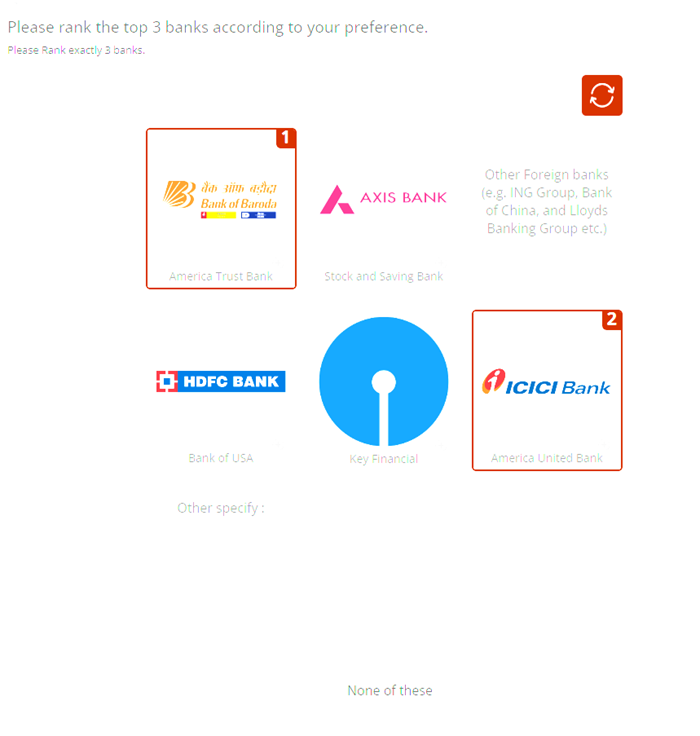
<checkbox
label="collapsibleRankingImage"
atleast="1"
atmost="3"
fir="off"
shuffle="rows">
<title>Please rank the top 3 banks according to your preference.</title>
<comment>Please Rank exactly 3 banks. </comment>
<group label="g1" builder:axis="row" builder:default="1"> </group>
<row label="r1" groups="g1">America United Bank{@imageURL::bank_1.png||largeImageURL::bank_1.png@}</row>
<row label="r2" groups="g1">Bank of USA{@imageURL::bank_2.png||largeImageURL::bank_2_L.png@}</row>
<row label="r3" groups="g1">America Trust Bank{@imageURL::bank_3.png||largeImageURL::bank_3_L.png@}</row>
<row label="r4" groups="g1">Key Financial{@imageURL::bank_4.png||largeImageURL::bank_4_L.png@}</row>
<row label="r5" groups="g1">Stock and Saving Bank{@imageURL::bank_5.png||largeImageURL::bank_5_L.png@}</row>
<row label="r6" groups="g1">Other Foreign banks (e.g. ING Group, Bank of China, and Lloyds Banking Group etc.)</row>
<row label="r7" groups="g1" open="1" openOptional="1" openSize="25" randomize="0">Other specify :</row>
<row label="r8" groups="g1" randomize="0">None of these{@globalExclusive::true@}</row>
<style name="page.head"><![CDATA[
<style>.answers{display:none;}#btn_continue{visibility:hidden;}</style>
]]></style>
<style name="question.after"><![CDATA[
<div class="ketool-stage" id="ketool-stage-${this.label}"></div>
<script type="text/javascript" src="${KEDomain}/framework.min.js"></script>
<script type="text/javascript">
if (!ketool.qDefs)
ketool.qDefs = {};
if (!ketool.toolLoader)
ketool.toolLoader = new ketool.Loader({
"baseFileURL": "${KEDomain}/",
"scriptDeps": ["fancyboxlib.js"],
"cssDeps": ["style_framework.css", "libs_fancybox.css", "ionicons.min.css", "keBrown.css"],
"coreFile": "core_app.js",
"messages": null,
"platformInterface": { "js": "platform_app.js", "css": "platform_style.css" }
});
ketool.qDefs["${this.label}"] = ${jsexport()};
var isTest = "${gv.isUser() and not gv.debug.respview}" === "True";
//SETTINGS AND STUFF GOES HERE
var toolSettings = {
"toolJs": "collapsible_app.js",
"toolName": "Collapsible",
"jsToLoad": [
],
"cssToLoad": [
"style_collapsible.css"
],
"baseToolPath": "${KEDomain}/",
"container": "#ketool-stage-${this.label}",
"qid": "${this.label}",
"time_qid": "${this.label}_Time",
"order_qid": "${this.label}_Order",
"imageBaseURL": "${KEDomain}/",
"minRequired": "3",
"maxAllowed": "3",
"showControls": false,
"numDecimalsTimeData": "2",
"expandButtonImage": "${KEDomain}/expand_2_4.png",
"collapseButtonImage": "${KEDomain}/collapse_2_3.png",
"scrollButtonImage": "${KEDomain}/go_up.png",
"resetButtonImage": "${KEDomain}/reset.png",
"resetButtonText": "",
"zoomButtonImage": "${KEDomain}/mag9.png",
"headerExpandImage": "${KEDomain}/chevron-down-grey.png",
"expandOnLoad": false,
"answerOptionShape": "square",
"isRanking": true,
"forceCardMode": true,
"matchHeightByRow":false,
"keepOtherAnswers":false,
"lazyLoadLargeImg":false,
"zoomPos":"bottom-right",//"bottom-right", "top-right", "bottom-left","top-left","no-zoom"
"showProgressBar": true,
"maxAllowedError": "<*ketoola*>",
"saveOtherOnDeselect": false,
"minOtherCharacter":1,
"customValidation": function(q){
console.log("customValidation()");
return true;
},
"answerItemConfig": {
"width": "100%",
"numItemsPerRow": { "small": 2, "medium": 3, "large": 3 }
}
};
ketool.toolLoader.registerSettings(toolSettings, function(info){
//console.log("Questions loaded",info);
info.instance.setToolValidation(toolSettings.customValidation);
info.bridge.setPageValidation(function(){
console.log("setPageValidation");
return true;
});
info.instance.on("tool_loaded", function(e){
//console.log("tool_loaded", e);
if(isTest){
${initKEToggleData()}
}
});
info.instance.on("tool_resize", function(e){
//console.log("tool_resize", e);
});
info.instance.on("tool_error", function(e){
//console.log("tool_error", e);
});
info.instance.on("group_expanded", function(e){
//console.log("group_expanded", e);
});
info.instance.on("group_collapsed", function(e){
//console.log("group_collapsed", e);
});
info.instance.on("item_statechange", function(e){
//console.log("item_statechange", e);
});
info.instance.on("exclusive_change", function(e){
//console.log("exclusive_change", e);
});
});
//END USER EDITABLE CODE
$ (document).ready(function(){
ketool.toolLoader.initLoad();
/*********fix for IE 9*************/
$ ('.instruction-text:gt(0)').hide();
$ ('.question-text:gt(0)').hide();
});
</script>
<style>
.ketool-container.ketool-collapsible-container .ketool-collapsible-button-holder{
height:30px;
}
.ketool-container.ketool-collapsible-container .ketool-collapsible-itemholder.no-group {
box-shadow: none;
}
.ketool-container.ketool-collapsible-container .ketool-collapsible-itemholder {
border: none;
}
.ketool-container.ketool-collapsible-container .ketool-card .label{
font-weight: normal;
transition: all 0.2s ease-in-out;
}
.ketool-container.ketool-collapsible-container .ketool-card .middle .label{
font-size: 16px;
}
.ketool-container .ketool-card-container.vertical div:empty {
display: block;
}
</style>
]]></style>
</checkbox>
<float
label="collapsibleRankingImage_Time"
shuffle="rows"
shuffleBy="collapsibleRankingImage"
translateable="0">
<title>Data node for time data. collapsibleRanking_Time.</title>
<comment>Please select one.</comment>
<group label="g1" builder:axis="row" builder:default="1"> </group>
<row label="r1" groups="g1">America United Bank{@imageURL::bank_1.png||largeImageURL::bank_1_L.png@}</row>
<row label="r2" groups="g1">Bank of USA{@imageURL::bank_2.png||largeImageURL::bank_2_L.png@}</row>
<row label="r3" groups="g1">America Trust Bank{@imageURL::bank_3.png||largeImageURL::bank_3_L.png@}</row>
<row label="r4" groups="g1">Key Financial{@imageURL::bank_4.png||largeImageURL::bank_4_L.png@}</row>
<row label="r5" groups="g1">Stock and Saving Bank{@imageURL::bank_5.png||largeImageURL::bank_5_L.png@}</row>
<row label="r6" groups="g1">Other Foreign banks (e.g. ING Group, Bank of China, and Lloyds Banking Group etc.)</row>
<row label="r7" groups="g1" randomize="0">Other</row>
<row label="r8" groups="g1">None of these</row>
<style name="question.after"><![CDATA[
<script type='text/javascript'>
if (ketool.qDefs)
ketool.qDefs["${this.label}"] = ${jsexport()};
</script>
]]></style>
</float>
<number
label="collapsibleRankingImage_Order"
shuffle="rows"
shuffleBy="collapsibleRankingImage"
size="2"
translateable="0">
<title>Data node for time data. collapsibleRanking_Order.</title>
<comment>Please select one.</comment>
<group label="g1" builder:axis="row" builder:default="1"> </group>
<row label="r1" groups="g1">America United Bank{@imageURL::bank_1.png||largeImageURL::bank_1_L.png@}</row>
<row label="r2" groups="g1">Bank of USA{@imageURL::bank_2.png||largeImageURL::bank_2_L.png@}</row>
<row label="r3" groups="g1">America Trust Bank{@imageURL::bank_3.png||largeImageURL::bank_3_L.png@}</row>
<row label="r4" groups="g1">Key Financial{@imageURL::bank_4.png||largeImageURL::bank_4_L.png@}</row>
<row label="r5" groups="g1">Stock and Saving Bank{@imageURL::bank_5.png||largeImageURL::bank_5_L.png@}</row>
<row label="r6" groups="g1">Other Foreign banks (e.g. ING Group, Bank of China, and Lloyds Banking Group etc.)</row>
<row label="r7" groups="g1" randomize="0">Other</row>
<row label="r8" groups="g1">None of these</row>
<style name="question.after"><![CDATA[
<script type='text/javascript'>
if (ketool.qDefs)
ketool.qDefs["${this.label}"] = ${jsexport()};
</script>
]]></style>
</number>General Instructions for all ketool setups
For all ketool setup, please implement the below
<exec when="init">
KEDomain = "https://au.focusvision.com/survey/selfserve/560/221003"
project_id = gv.survey.path

def initKEToggleData():
  returntext = "\n var dataToggler = jQuery('<div>For testing only - click here to expand data capturing nodes to verify the data capture during test mode.</div>');\n"
  returntext += "dataToggler.addClass('dataToggle');\n"
  returntext += "dataToggler.css({'text-decoration': 'underline','font-size': 'small','color': 'blue','cursor': 'pointer','margin-top': '20px'});\n"
  returntext += "jQuery('.ketool-stage').last().after(dataToggler);\n"
  returntext += "dataToggler.click(info.bridge.toggleDataNodes());\n"
  return returntext

def initkelegacyDataToggle():
  if gv.isUser() and not gv.debug.respview:
    output = "<script>\n"
    output += "var dataToggler = jQuery('<div>Please click here to see the data nodes for this tool.</div>');\n"
    output += "dataToggler.addClass('dataToggle');\n"
    output += "dataToggler.css({'text-decoration': 'underline','font-size': 'small','color': 'blue','cursor': 'pointer','margin-top': '20px'});\n"
    output += "dataToggler.click(kelegacyDataToggle);\n"
    output += "function kelegacyDataToggle(){ if(jQuery('.survey-page').hasClass('showkelegacyData')) jQuery('.survey-page').removeClass('showkelegacyData'); else jQuery('.survey-page').addClass('showkelegacyData');  }\n"
    output += "jQuery(function(){jQuery ('.survey-buttons').before(dataToggler); })\n"
    output += "</script>\n"
    output += "<style>.showkelegacyData .answers,.showkelegacyData .question{display: block !important;visibility: visible !important;}</style>\n"
    return output
  else:
    return ""
</exec>
We also have few general options in all ketool setups with function “initKEToggleData” is being called, which should not be changed, these are:
- toolJs: This option contains the name of js file for respective tool
- toolName: This option contains the name of tool
- jsToLoad: This option contains the name(s) of additional js file(s) to load for respective tool
- cssToLoad: This option contains the name(s) of css file for respective tool
- baseToolPath: This option stores the path where any of the above files are stored
- container: This contains the id for calling the div where the tool is rendered
- qid: This stores the current question label to refer
These options are optional and should only be implemented if needed:
- time_qid: This option stores the question label where the time spent on each option (in case it is needed) is stored
- order_qid: This option stores the question label where the order in which an option is answered is stored
- numDecimalsTimeData: This stores the decimal places for the data stored in time spent question
- customValidation: Can be used to specify any custom validation using js
- answerItemConfig: Have the below values which can be used to determine the appearance of the question:
- width: This option stores the width occupied by the question
- numItemsPerRow: Has 3 options below based on screen sizes:
- small: Here we can specify the number if items shown in a row (i.e. horizontally) on small screens (such as few tablets and all phones)
- medium: Here we can specify the number if items shown in a row (i.e. horizontally) on medium screens (such as few tablets and some laptops/desktops with small screen size/resolution)
- large: Here we can specify the number if items shown in a row (i.e. horizontally) on large screens (such as laptops/desktops with large screen size/resolution)
- imageBaseURL: This stores the path for all the images used in the setup (so images can just be called by their name if this is specified
For any follow-up question (including “_time”, “_order” questions) should include the below code:
<exec when="init">
<style name="question.after"><![CDATA[
<script type='text/javascript'>if (ketool.qDefs) ketool.qDefs["${this.label}"] = ${jsexport()};</script>
]]></style>
Collapsible based Setups (#2, #3, #4, #5 & #6)
We have multiple setups i.e. Collapsible Single, Collapsible Multi, Collapsible Number/Text, Click Ranking with “Other” box and Click Ranking (Image) with “Other” box based on base collapsible type questions, so for these we will have below settings and its uses:
| Tool Settings | Use | Value Type / Syntax | Default Value / Possible Values | |
|---|---|---|---|---|
| minRequired | The minimum required answers to select. | Number > 0 | 2 | |
| maxAllowed | The maximum number of answers that can be selected | Number > 0 | 5 | |
| numDecimalsTimeData | The number of decimal places that the time data should be rounded to. E.g. set to 2 for two decimal places - 2.73. | Number > 0 | 2 | |
| expandButtonImage | Image URL to use for the background of the 'expand' button. | string | Path already specified; no change needed here | |
| showControls | Whether the expand/collapse all buttons should be shown to the user. | boolean | true (should be false for click ranking question) | |
| collapseButtonImage | Image URL to use for the background of the 'collapse' button. | string | Path already specified; no change needed here | |
| resetButtonImage | Image URL to use for the background of the 'reset' button. If 'resetButtonText' is also set, then both will be used, with the text appearing after the image. | string | Path already specified; no change needed here | |
| resetButtonText | Text used for the reset button. If 'resetButtonImage' is also set, then both will be used, with the text appearing after the image. | string | Reset | |
| scrollButtonImage | Image URL to use for the background of the 'scroll to top' button. | string | Path already specified; no change needed here | |
| zoomButtonImage | Image URL to use for the 'zoom' button that appears on answer cards. | string | Path already specified; no change needed here | |
| headerExpandImage | Image URL to use for the 'expand' icon on each group header. | string | Path already specified; no change needed here | |
| expandOnLoad | Whether all group headings should be initially shown with their contents expanded, when the tool loads. | boolean | true (should be false for click ranking question) | |
| answerOptionShape | The 'tick' shape to use for all answer options. Acceptable values are 'circle' or 'square' | fixed string | Default value: circle
Possible values: ["circle","square"] |
|
| showProgressBar | Whether the image preloader progress bar will be shown to the user. | boolean | true | |
| isRanking | Whether the answer items will have their 'ranking' (order of selections) visible instead of checkmarks. | boolean | false (should be true for ranking question) | |
| forceCardMode | Whether the answer items will be displayed as 'cards' even when they just contain text. This helps to reduce bias when there is mixed content (e.g. some items containing images and some without). | boolean | false (should be true for ranking question) | |
| matchHeightByRow | Whether match the answer item height per row. | boolean | false | |
| lazyLoadLargeImg | Whether the tool will wait for large images to be loaded before rendered. If true, it will not wait. Required only when image items are used. | boolean | false | |
| zoomPos | Position of zoom button on the card.Required only when image items are used. | fixed string | Default value: bottom-right
Possible values: ["bottom-right","top-right","bottom-left","top-left","no-zoom"] |
|
| maxAllowedError | Text used for the error message that appears when the user has selected too many answer options and attempts to select another. | string | Too many items selected. Please deselect one before selecting another. | |
| saveOtherOnDeselect | Whether open ended text responses are cleared when the answer option is deselected. | boolean | false | |
| minOtherCharacter | Minimal required number of characters for other specify item | Number > 0 | 1 | |
| minOTLCharacter | Minimal required number of characters for input box when the question type is open text list | Number > 0 | 1 | |
| answerItemConfig | width | item width | String (for width in px, %, em, rem) | 100% |
| numItemsPerRow | number of items per row to be displayed in a grid system (specified among small, medium and large) | custom format | {"small": 1, "medium": 1, "large": 1}
Here we can specify number in the above (i.e. replace 1 by specific value) |
|
| Row Options | Use | Value Type / Syntax | Possible Values / Remarks |
|---|---|---|---|
| imageURL | URL for image to be displayed in the answer option cards. | string | Image file URL |
| largeImageURL | Alternative URL for image to be displayed in the zoom window if different from the image in the card. | string | Image file URL |
| width | Custom width to apply to this answer option. | string | Width in px, rem, em or % |
| height | Custom height to apply to this answer option. | string | Width in px, rem, em or % |
| globalExclusive | Whether the answer option should be treated as a global exclusive. This will be displayed as a global exclusive item. | boolean |
|
| groupExclusive | Whether the answer option should be treated as a group exclusive. This will be displayed as a regular answer option. | boolean |
|
| cardType | Custom card type if different from default card mode defined in the tool. | string | ["vertical","horizontal"] |
| minOtherCharacter | Text used for the reset button. If 'resetButtonImage' is also set, then both will be used, with the text appearing after the image. | Number > 0 |
|
| Row Group Options | Use | Value Type / Syntax | Possible Values / Remarks |
|---|---|---|---|
| minRequired | The minimum number of answer options that must be selected in this group, before validation can successfully pass. | Number > 0 |
|
| maxAllowed | The maximum number of answer options that can be selected in this group, before no more can be selected. | Number > 0 |
|
| expandOnLoad | Custom width to apply to this answer option. | boolean | Whether this group is initially shown expanded when the tool loads. |