
Grid Comparison (#24 & #25)
Copy the below questions and update rows, columns and tool settings accordingly..
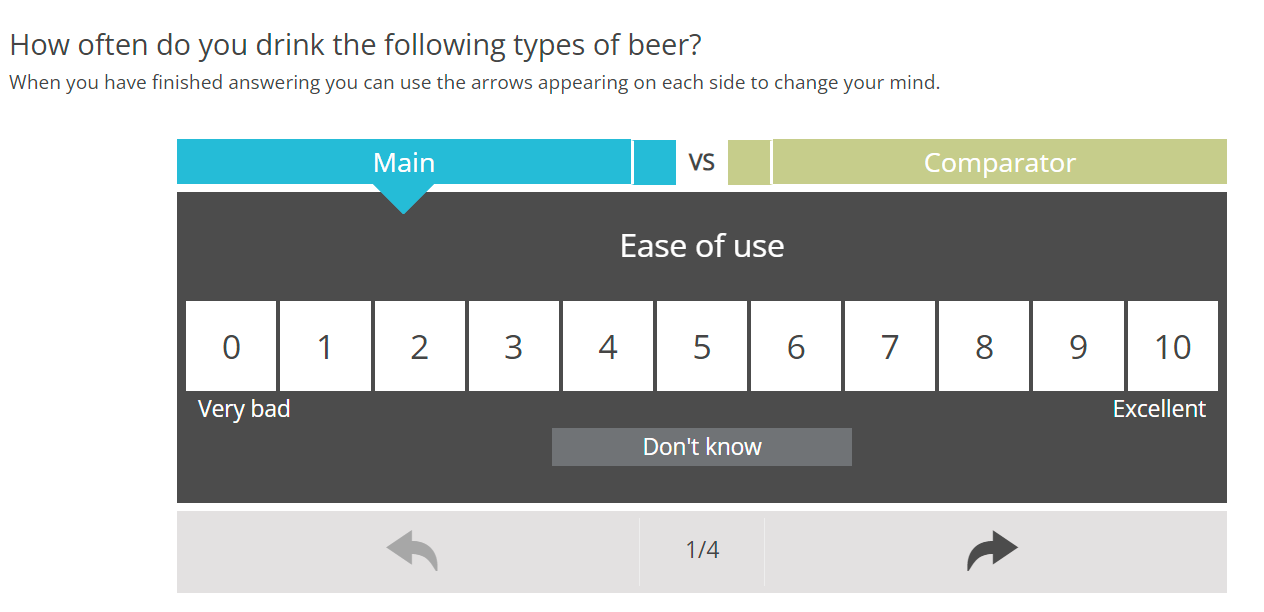
  <radio
   label="QGridComparisonMain"
   fir="off"
   keepWith="QGridComparisonComp"
   randomize="0">
    <title>How often do you drink the following types of beer?</title>
    <comment>When you have finished answering you can use the arrows appearing on each side to change your mind.</comment>
    <row label="r1">Ease of use</row>
    <row label="r2">Good location</row>
    <row label="r3">Friendly crew</row>
    <row label="r4">Overall satisfaction</row>
    <col label="c0" value="0">0</col>
    <col label="c1" value="1">1</col>
    <col label="c2" value="2">2</col>
    <col label="c3" value="3">3</col>
    <col label="c4" value="4">4</col>
    <col label="c5" value="5">5</col>
    <col label="c6" value="6">6</col>
    <col label="c7" value="7">7</col>
    <col label="c8" value="8">8</col>
    <col label="c9" value="9">9</col>
    <col label="c10" value="10">10</col>
    <col label="c99" value="99">Don't know</col>
    <style name="page.head"><![CDATA[
<style>
.answers{display:none;}
</style>
]]></style>
    <style name="question.after"><![CDATA[
<style>.answers, .question~.question{display: none;}</style>

<script type="text/javascript" src="${KEDomain}/core/legacytool/application_decipher_v2.0.js"></script>

    <script type="text/javascript">
    var coffeebeans;
    (function (coffeebeans) {
      if (!coffeebeans.qDefs)
        coffeebeans.qDefs = {};
        coffeebeans.qDefs["${this.label}"] = ${jsexport()};
      $ (document).ready(function(){
        parseJsexportData();
      });
    })(coffeebeans || (coffeebeans = {}));

    </script>


<link rel="stylesheet" type="text/css" href="${KEDomain}/tools/grid_compare/gridComparison.css">
<link rel="stylesheet" type="text/css" href="${KEDomain}/core/ionicons/ionicons.min.css">
<script type="text/javascript" src="${KEDomain}/tools/grid_compare/gridComparison.min.js"></script>
<script>
$ (function() {
    $ ('.toolContainer').gridComparison({

        sMainLabelText: 'Main', // label of the main product/brand - can be piped - if piped from user input please escape any quotes ....  .Replace("'", "\\\'").Replace("\"", "\\\"")
        sCompLabelText: 'Comparator', // label of the compatitor - can be piped - if piped from user input please escape any quotes ....  .Replace("'", "\\\'").Replace("\"", "\\\"")
        sMainForm: getFormName(1), // main form name
        sCompForm: getFormName(2), // comp form name
        sCompSepText: 'VS', // separator text
        sForwardbutton: '#btn_continue', // forward button selector - used to toggle next button

        bShowCompSep: true, // show/hide the main/comp separator
        bShowNav: true, // show/hide the navigation
        bShowProgress: true, // show iteration progress
        bAutoSubmit: false, // if true - will auto-submit once both positive and negative are answered
        bAutoNext: true, // auto go to next scale (comp)
        bAutoGoToNextItem: false, // auto go to next item - will work if bAutoNext is also set to true

        sLegendPosition: 'bottom', // legend position - "bottom" or "top"
        sLegendLeftText: 'Very bad', // text of the left legend
        sLegendMidText: '', // text of the middle legend
        sLegendRightText: 'Excellent', // text of the right legend

        sNavLeftText: '<i class="ion-ios-undo ion"></i>', // navigation text left
        sNavRightText: '<i class="ion-ios-redo ion"></i>', // navigation text right

        sProgressSepText: '/', // progress separator text

        aDKcodes: ['99'], // dk codes arra of string codes ex. ["99", "999"]
        sDKvalText: '-', // DK value text for the top container

        nextTargetDelay: 10, // next target delay
        nextItemDelay: 600, // next item delay
        nextItemAnimation: 500, // next item animation

        aOtherCodes: []
    });


});
</script>
${initkelegacyDataToggle()}
]]></style>
  </radio>

  <radio
   label="QGridComparisonComp"
   fir="off"
   keepWith="QGridComparisonMain"
   randomize="0">
    <title>How often do you drink the following types of beer?</title>
    <comment>When you have finished answering you can use the arrows appearing on each side to change your mind.</comment>
    <row label="r1">Ease of use</row>
    <row label="r2">Good location</row>
    <row label="r3">Friendly crew</row>
    <row label="r4">Overall satisfaction</row>
    <col label="c0" value="0">0</col>
    <col label="c1" value="1">1</col>
    <col label="c2" value="2">2</col>
    <col label="c3" value="3">3</col>
    <col label="c4" value="3">4</col>
    <col label="c5" value="3">5</col>
    <col label="c6" value="3">6</col>
    <col label="c7" value="3">7</col>
    <col label="c8" value="3">8</col>
    <col label="c9" value="3">9</col>
    <col label="c10" value="3">10</col>
    <col label="c99" value="99">Don't know</col>
    <style name="question.after"><![CDATA[
<script type='text/javascript'>
  if (coffeebeans.qDefs)
    coffeebeans.qDefs["${this.label}"] = ${jsexport()};
</script>

<!-- HTML -->
<div class="gridComparison-container"><img class="img-responsive loading-container" src="${KEDomain}/curve.gif" /><div class="inner-container"><div class="top-container"></div><div class="option-scale"></div><div class="progress-nav-container"></div></div></div> <!-- End of HTML -->
]]></style>
  </radio>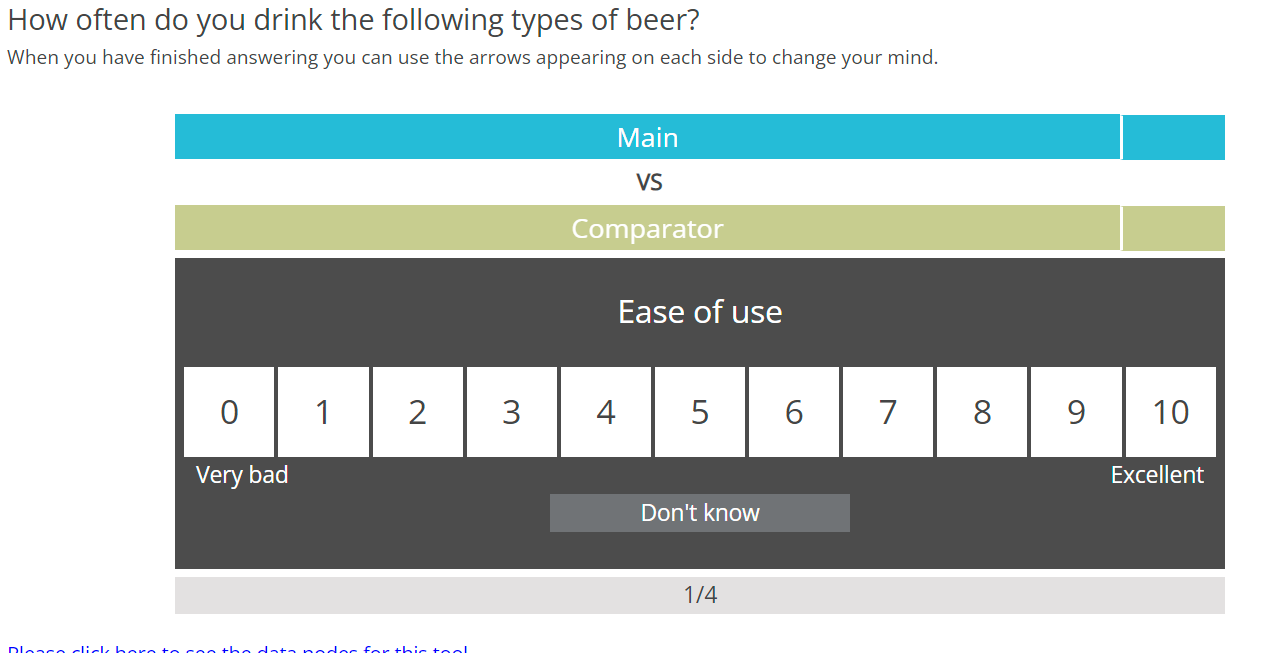
  <radio
   label="QGridComparisonMain2"
   fir="off"
   keepWith="QGridComparisonComp2"
   randomize="0">
    <title>How often do you drink the following types of beer?</title>
    <comment>When you have finished answering you can use the arrows appearing on each side to change your mind.</comment>
    <row label="r1">Ease of use</row>
    <row label="r2">Good location</row>
    <row label="r3">Friendly crew</row>
    <row label="r4">Overall satisfaction</row>
    <col label="c0" value="0">0</col>
    <col label="c1" value="1">1</col>
    <col label="c2" value="2">2</col>
    <col label="c3" value="3">3</col>
    <col label="c4" value="4">4</col>
    <col label="c5" value="5">5</col>
    <col label="c6" value="6">6</col>
    <col label="c7" value="7">7</col>
    <col label="c8" value="8">8</col>
    <col label="c9" value="9">9</col>
    <col label="c10" value="10">10</col>
    <col label="c99" value="99">Don't know</col>
    <style name="page.head"><![CDATA[
<style>.answers{display:none;}</style>
]]></style>
    <style name="question.after"><![CDATA[
<style>
.answers, .question~.question{display: none;}

.legend-right {text-align: right!important;}
.legend-left {text-align: left !important;}
.current-comp .left-container .value-inner { color: #3c3c3c; }

.top-inner.value-outer {
  width: 10%;
}

.top-inner.label-outer {
  width: 90%;
}

.top-outer.left-container,
.top-outer.right-container,
.top-outer.middle-container {
  width: 100%;
}

.current-comp .right-container .label-outer:after, .current-comp .right-container .label-outer:before,
.current-main .left-container .label-outer:after, .current-main .left-container .label-outer:before {
  border-color: transparent;
}

.top-outer.right-container .top-inner.value-outer {
      border-right: none;
      border-left: 2px solid #fff;
}

.top-outer.middle-container .top-inner.vs-container {
  padding-right: 10.3%;
}

.inner-container .left-container, .inner-container .right-container {
  opacity: 0.2;
}
.value-inner {
  transform: scale(1);
  -webkit-transition: all 0.1s ease-in-out;
  -o-transition: all 0.1s ease-in-out;
  -moz-transition: all 0.1s ease-in-out;
  transition: all 0.1s ease-in-out;
}

.value-inner:empty {
  transform: scale(0.1);
}

.top-outer .top-inner.label-outer:after,
.top-outer .top-inner.label-outer:before {
  content: none;
}

.progress-outer .nav-inner {width: 44%;}
.progress-outer .progress-middle {width: 12%;}
</style>

<script type="text/javascript" src="${KEDomain}/core/legacytool/application_decipher_v2.0.js"></script>

    <script type="text/javascript">
    var coffeebeans;
    (function (coffeebeans) {
      if (!coffeebeans.qDefs)
        coffeebeans.qDefs = {};
        coffeebeans.qDefs["${this.label}"] = ${jsexport()};
      $ (document).ready(function(){
        parseJsexportData();
      });
    })(coffeebeans || (coffeebeans = {}));

    </script>

<link rel="stylesheet" type="text/css" href="${KEDomain}/tools/grid_compare/gridComparison.css">
<link rel="stylesheet" type="text/css" href="${KEDomain}/core/ionicons/ionicons.min.css">
<script type="text/javascript" src="${KEDomain}/tools/grid_compare/gridComparison.min.js"></script>
<script>

$ (function() {
    $ ('.toolContainer').gridComparison({

      sMainLabelText: 'Main', // label of the main product/brand - can be piped
      sCompLabelText: "Comparator", // label of the compatitor - can be piped
      sMainForm: getFormName(1), // main form name
      sCompForm: getFormName(2), // comp form name
      sComparisonSepText: 'VS', // separator text
      sForwardbutton: '#btn_continue', // forward button selector - used to toggle next button

      bShowCompSep: true, // show/hide the main/comp separator
      bShowProgress: true, // show iteration progress
      bShowNav: false, // show/hide the navigation
      bAutoSubmit: false, // if true - will auto-submit once both positive and negative are answered
      bAutoNext: true, // auto go to next scale (comp)
      bAutoGoToNextItem: true, // auto go to next item - will work if bAutoNext is also set to true

      sLegendPosition: 'bottom', // legend position - "bottom" or "top"
      sLegendLeftText: 'Very bad', // text of the left legend
      sLegendMidText: '', // text of the middle legend
      sLegendRightText: 'Excellent', // text of the right legend

      sNavLeftText: '<', // navigation text left
      sNavRightText: '>', // navigation text right

      sProgressSepText: '/', // progress separator text

      aDKcodes: ['99'], // dk codes arra of string codes ex. ["99", "999"]
      sDKvalText: '-', // DK value text for the top container

      nextTargetDelay: 10, // next target delay
      nextItemDelay: 600, // next item delay
      nextItemAnimation: 500, // next item animation

      aOtherCodes: []
    });

});


setTimeout(function(){
      $ ('.top-inner.value-outer').eq(1).insertAfter($ ('.top-inner.label-outer').eq(1));
},750);
</script>
${initkelegacyDataToggle()}
]]></style>
  </radio>

  <radio
   label="QGridComparisonComp2"
   fir="off"
   keepWith="QGridComparisonMain2"
   randomize="0">
    <title>How often do you drink the following types of beer?</title>
    <comment>When you have finished answering you can use the arrows appearing on each side to change your mind.</comment>
    <row label="r1">Ease of use</row>
    <row label="r2">Good location</row>
    <row label="r3">Friendly crew</row>
    <row label="r4">Overall satisfaction</row>
    <col label="c0" value="0">0</col>
    <col label="c1" value="1">1</col>
    <col label="c2" value="2">2</col>
    <col label="c3" value="3">3</col>
    <col label="c4" value="3">4</col>
    <col label="c5" value="3">5</col>
    <col label="c6" value="3">6</col>
    <col label="c7" value="3">7</col>
    <col label="c8" value="3">8</col>
    <col label="c9" value="3">9</col>
    <col label="c10" value="3">10</col>
    <col label="c99" value="99">Don't know</col>
    <style name="question.after"><![CDATA[
<script type='text/javascript'>
  if (coffeebeans.qDefs)
    coffeebeans.qDefs["${this.label}"] = ${jsexport()};
</script>

<!-- HTML -->
<div class="gridComparison-container"><img class="img-responsive loading-container" src="${KEDomain}/curve.gif" /><div class="inner-container"><div class="top-container"></div><div class="option-scale"></div><div class="progress-nav-container"></div></div></div> <!-- End of HTML -->
]]></style>
  </radio>

  <suspend/>
General Instructions for all ketool setups
For all ketool setup, please implement the below
<exec when="init">
KEDomain = "https://au.focusvision.com/survey/selfserve/560/221003"
project_id = gv.survey.path

def initKEToggleData():
  returntext = "\n var dataToggler = jQuery('<div>For testing only - click here to expand data capturing nodes to verify the data capture during test mode.</div>');\n"
  returntext += "dataToggler.addClass('dataToggle');\n"
  returntext += "dataToggler.css({'text-decoration': 'underline','font-size': 'small','color': 'blue','cursor': 'pointer','margin-top': '20px'});\n"
  returntext += "jQuery('.ketool-stage').last().after(dataToggler);\n"
  returntext += "dataToggler.click(info.bridge.toggleDataNodes());\n"
  return returntext

def initkelegacyDataToggle():
  if gv.isUser() and not gv.debug.respview:
    output = "<script>\n"
    output += "var dataToggler = jQuery('<div>Please click here to see the data nodes for this tool.</div>');\n"
    output += "dataToggler.addClass('dataToggle');\n"
    output += "dataToggler.css({'text-decoration': 'underline','font-size': 'small','color': 'blue','cursor': 'pointer','margin-top': '20px'});\n"
    output += "dataToggler.click(kelegacyDataToggle);\n"
    output += "function kelegacyDataToggle(){ if(jQuery('.survey-page').hasClass('showkelegacyData')) jQuery('.survey-page').removeClass('showkelegacyData'); else jQuery('.survey-page').addClass('showkelegacyData');  }\n"
    output += "jQuery(function(){jQuery ('.survey-buttons').before(dataToggler); })\n"
    output += "</script>\n"
    output += "<style>.showkelegacyData .answers,.showkelegacyData .question{display: block !important;visibility: visible !important;}</style>\n"
    return output
  else:
    return ""
</exec>
Grid Comparison (#24 & #25)
We have two types of Grid Comparison mentioned above which have the same setting parameters mentioned below.
| Tool Settings | Use | Value Type / Syntax | Default Value / Possible Values |
|---|---|---|---|
| sMainLabelText | label of the main product/brand - can be piped - if piped from user input please escape any quotes .... .Replace("'", "\\\'").Replace("\"", "\\\"") | string |
|
| sCompLabelText | label of the compatitor - can be piped - if piped from user input please escape any quotes .... .Replace("'", "\\\'").Replace("\"", "\\\"") | string |
|
| sMainForm | main form name | Fixed string | DO NOT CHANGE |
| sCompForm | comp form name | Fixed string | DO NOT CHANGE |
| sCompSepText | separator text | string | VS |
| sForwardbutton | forward button selector - used to toggle next button | string | ........ |
| bShowCompSep | show/hide the main/comp separator | String (containing selector for next / continue button) | #btn_continue |
| bShowNav | show/hide the navigation | boolean |
|
| bShowProgress | show iteration progress | boolean |
|
| bAutoSubmit | if true - will auto-submit once both positive and negative are answered | boolean |
|
| bAutoNext | auto go to next scale (comp) | boolean |
|
| bAutoGoToNextItem | auto go to next item - will work if bAutoNext is also set to true | boolean |
|
| sLegendPosition | legend position - "bottom" or "top" | fixed string | Default value: bottom
Possible values: ["bottom", "top"] |
| sLegendLeftText | text of the left legend | string |
|
| sLegendMidText | text of the middle legend | string |
|
| sLegendRightText | text of the right legend | string |
|
| sNavLeftText | navigation text left | string |
|
| sNavRightText | navigation text right | string |
|
| sProgressSepText | progress separator text | string | / |
| aDKcodes | dk codes array of string codes | array | e.g. ["99", "999"] |
| sDKvalText | DK value text for the top container | string | - |
| nextTargetDelay | next target delay | Number > 0 | 10 |
| nextItemDelay | next item delay | Number > 0 | 600 |
| nextItemAnimation | next item animation | Number > 0 | 500 |
| aOtherCodes | dk codes array of string codes | array | e.g. ["98", "998"] |