
Max-Diff Click Style (#32)
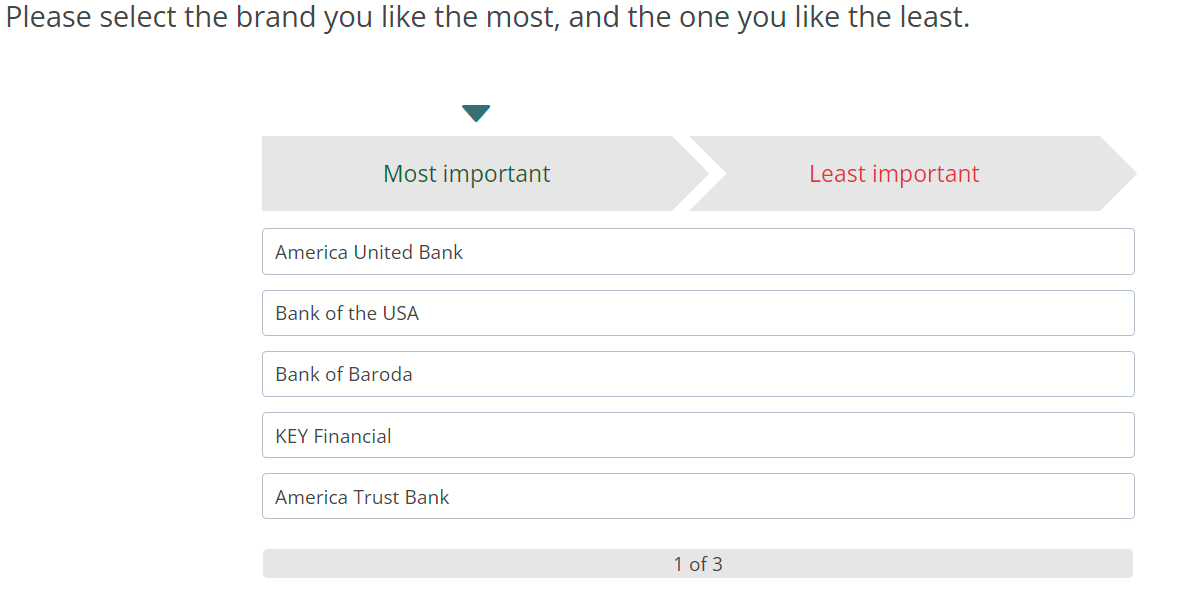
Below is the question which should be copied and question text, question label, row text and column text should be updated accordingly.
Note: Make sure the rows have label starting with "r" (e.g. r1, r2, etc.) and columns have label starting with "c" (e.g. c1, c2, etc.)
 <radio
   label="maxDiffMobile"
   fir="off"
   randomize="0"
   surveyDisplay="desktop">
    <title>Please select the brand you like the most, and the one you like the least.</title>
    <row label="r1">Most important</row>
    <row label="r2">Least important</row>
    <col label="c1">America United Bank</col>
    <col label="c2">Bank of the USA</col>
    <col label="c3">Bank of Baroda</col>
    <col label="c4">KEY Financial</col>
    <col label="c5">America Trust Bank</col>
    <style name="page.head"><![CDATA[
<style>.answers{display:none;}</style>
]]></style>
    <style name="question.after"><![CDATA[
<style>.answers{display: none} .progress-container {text-align: center;}</style>

          <script type="text/javascript" src="${KEDomain}/core/legacytool/application_decipher_v1.1.js"></script>

              <script type="text/javascript">
              var coffeebeans;
              (function (coffeebeans) {
                if (!coffeebeans.qDefs)
                  coffeebeans.qDefs = {};
                  coffeebeans.qDefs["${this.label}"] = ${jsexport()};
                $ (document).ready(function(){
                  parseJsexportData();
                });
              })(coffeebeans || (coffeebeans = {}));

              </script>

          <link rel="stylesheet" href="${KEDomain}/tools/click_maxDiff/maxdiff.min.css">
          <link rel="stylesheet" href="${KEDomain}/core/ionicons/ionicons.min.css">

          <script src="${KEDomain}/tools/click_maxDiff/maxdiff.min.js"></script>

          <div class="maxdiff-container"><img class="img-responsive loading-container" src="${KEDomain}/core/images/curve.gif"/><div class="inner-container"><div class="scale-container"></div><div class="options-container"></div><div class="progress-container"></div></div></div>

          <script>
          $ (function() {
              $ ('.toolContainer').MaxDiff({


                  sTheForm: getFormName(1), // question element id
                  sProgressCurrentIterationText: '1', // current iteration text
                  sProgressTotalIterationsText: '3', // update loopname if necessary
                  sProgressSplitText: ' of ', // progress count splitter
                  iSetMinHeight: null, // if set - will add min height to all item containers
                  sForwardbutton: '#btn_continue', // forward button selector - used to toggle next button
                  bReverseScale: false, // if true - left scale will be negative, right scale will be positive
                  bShowProgress: true, // show iteration progress
                  bAutoSubmit: false // if true - will auto-submit once both positive and negative are answered
              });


          });
          </script>
${initkelegacyDataToggle()}
]]></style>
  </radio>
General Instructions for all ketool setups
For all ketool setup, please implement the below
<exec when="init">
KEDomain = "https://au.focusvision.com/survey/selfserve/560/221003"
project_id = gv.survey.path

def initKEToggleData():
  returntext = "\n var dataToggler = jQuery('<div>For testing only - click here to expand data capturing nodes to verify the data capture during test mode.</div>');\n"
  returntext += "dataToggler.addClass('dataToggle');\n"
  returntext += "dataToggler.css({'text-decoration': 'underline','font-size': 'small','color': 'blue','cursor': 'pointer','margin-top': '20px'});\n"
  returntext += "jQuery('.ketool-stage').last().after(dataToggler);\n"
  returntext += "dataToggler.click(info.bridge.toggleDataNodes());\n"
  return returntext

def initkelegacyDataToggle():
  if gv.isUser() and not gv.debug.respview:
    output = "<script>\n"
    output += "var dataToggler = jQuery('<div>Please click here to see the data nodes for this tool.</div>');\n"
    output += "dataToggler.addClass('dataToggle');\n"
    output += "dataToggler.css({'text-decoration': 'underline','font-size': 'small','color': 'blue','cursor': 'pointer','margin-top': '20px'});\n"
    output += "dataToggler.click(kelegacyDataToggle);\n"
    output += "function kelegacyDataToggle(){ if(jQuery('.survey-page').hasClass('showkelegacyData')) jQuery('.survey-page').removeClass('showkelegacyData'); else jQuery('.survey-page').addClass('showkelegacyData');  }\n"
    output += "jQuery(function(){jQuery ('.survey-buttons').before(dataToggler); })\n"
    output += "</script>\n"
    output += "<style>.showkelegacyData .answers,.showkelegacyData .question{display: block !important;visibility: visible !important;}</style>\n"
    return output
  else:
    return ""
</exec>
Max-Diff click style settings (#32)
Below are the tool settings for Max-Diff click style setup:
| Tool Settings | Use | Value Type / Syntax | Default Value / Possible Values |
|---|---|---|---|
| sTheForm | Question element ID | string | getFormName(1) |
| bReverseScale | If set to true - reverses the color style for the scales | boolean | false |
| iSetMinHeight | If set with an integer - will add minimum height with the value provided for the item containers | integer |
|
| bShowProgress | If set to false - hides the iteration progress indicator | boolean | true |
| bAutoSubmit | If set to true - the page is auto submitted after the 2 scales are answered | boolean | false |
| iLoadDelay | Delay for showing the tool after the files are loaded and html is generated | integer | 100 |
| sForwardbutton | The query selector for the next button. Used for toggling the next button | String (for continue button ID) | #forwardbutton |
| sProgressCurrentIterationText | Pipe in the current iteration value | string | Pipe in current loop row sequence here |
| sProgressSplitText | Text splitting the current and the total number of iterations for the progress | string | “ out of “ |
| sProgressTotalIterationsText | Pipe in the total iteration count | string | Pipe in total number of looprow |