
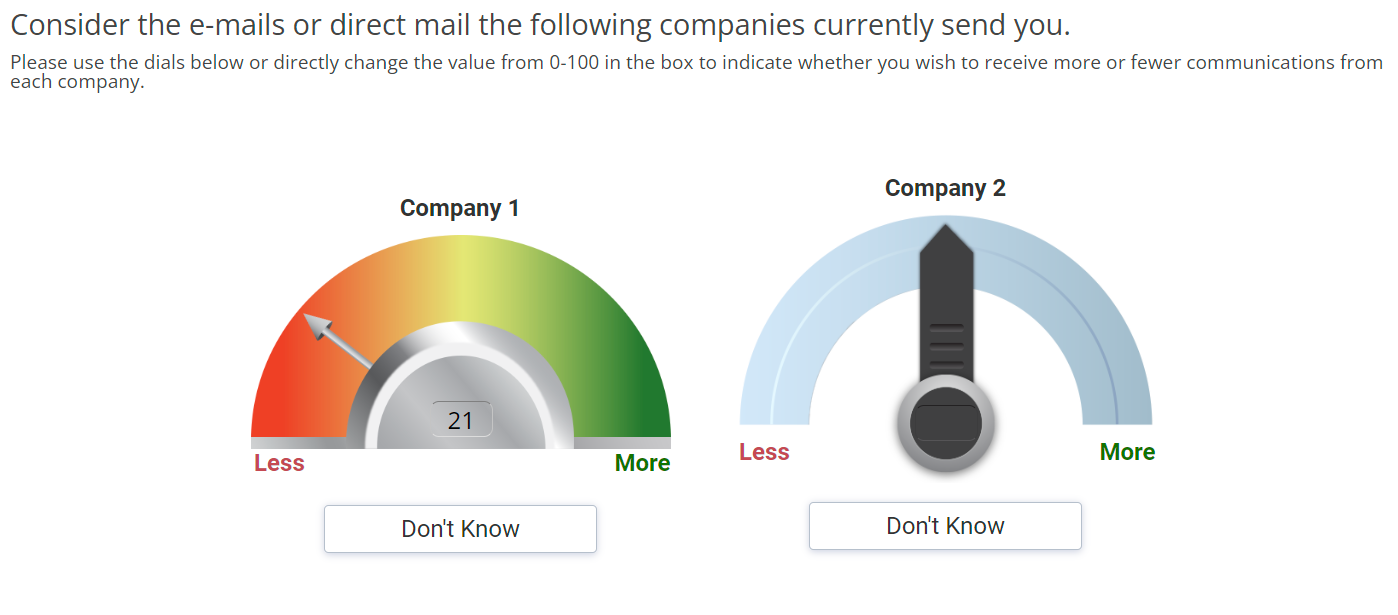
For this question, a float or number question will be implemented using the below code. Additionally, we should also create the same number of slider containers reflecting the number of rows with each having a unique ID, in the below mentioned container.
    <number
   <div class="sliderContainer">
    <div id= "toolContainer1"></div>
    <div id= "toolContainer2"></div>
	 <div id= "toolContainer3"></div>
	 .
	 .
	 .
	 .
	 .
	 and so on based on number of rows
    </div>
Similarly the below function will also be called for each slider / row (this is only applicable in case eac h slider has a distinct theme and parameters). In rest of the cases, a loop can be used where we oinly have to udpate the value for "dataholder" parameter.
     jQuery("#toolContainer1").circleSlider({
          length:300,
          cAll:false,
          theme: "theme1",
          sLeft:"Less",
          sRight:"More",
          dataholder : "#"+getQuestionInputId(formData.qType, formData.qid, items[0][0]),
          sTitle:items[1][0],
          sURL    : url,
          arrowImg: "arrow.png",
          backImg : "back.png",
          step:1,
          min:0,
          max:100,
          navigation: '#btn_continue',
          animate:true,
          shwTxtBox:true,
          dkCode : "999",
          dkText : "Don't Know",
          isRTL: false,
          initValue: 20
        });
Below is the question with 2 rows with different themes for each (as mentioned in the screenshot above
    <number
   label="jSL002_1"
   optional="0"
   randomize="0"
   size="4">
    <title>Consider the e-mails or direct mail the following companies currently send you.</title>
    <comment>Please use the dials below or directly change the value from 0-100 in the box to indicate whether you wish to receive more or fewer communications from each company.</comment>
    <row label="r1">Company 1</row>
    <row label="r2">Company 2</row>
    <style name="page.head"><![CDATA[
<style>.answers{display:none;}</style>
]]></style>
    <style cond="1" name="question.after"><![CDATA[
<script type="text/javascript" src="${KEDomain}/core/legacytool/application_decipher_v1.1.js"></script>
    <script type="text/javascript">
    var coffeebeans;
    (function (coffeebeans) {
    if (!coffeebeans.qDefs)
        coffeebeans.qDefs = {};
    coffeebeans.qDefs["${this.label}"] = ${jsexport()};

    $ (document).ready(function(){
      parseJsexportData();
    });

    })(coffeebeans || (coffeebeans = {}));

    </script>

    <script src="${KEDomain}/core/plugins/jquery-ui.js"></script>
    <script src="${KEDomain}/core/plugins/jquery.ui.touch-punch.min.js"></script>
    <script src="${KEDomain}/core/plugins/raphael-min.js"></script>

    <script src="${KEDomain}/tools/semi_circle_slider/basicSlider.min.js"></script>
    <script src="${KEDomain}/tools/semi_circle_slider/circleSlider.min.js"></script>

    <link rel="stylesheet" href="${KEDomain}/core/plugins/jquery-ui.css">
    <link rel="stylesheet" href="${KEDomain}/tools/semi_circle_slider/basicSlider.css">

    <link rel="stylesheet" href="${KEDomain}/tools/semi_circle_slider/circleSlider.css">
    <link rel="stylesheet" href="${KEDomain}/tools/semi_circle_slider/semiCircle_slider.css">

    <!--[if lt IE 9]>
    <link rel="stylesheet" href="${KEDomain}/tools/semi_circle_slider/circleSliderIE3.css">
    <![endif]-->
    <style>.answers{display:none;} #btn_continue{visibility: hidden;} .sliderContainer { margin-bottom: 40px; }</style>

    <div class="sliderContainer">
    <div id= "toolContainer1"></div>
    <div id= "toolContainer2"></div>
    </div>

    <script>
      jQuery(document).ready(function(){
        var form = getFormName(1);
        var items = getNumericItems(form);
        var formData = kelegacyPageObjDecipher[form];
        var theme = "theme2";
        //pre-loading
        var url = "${KEDomain}/tools/semi_circle_slider/themes/";
        var _imgA = [];
        var _imgs = [url+theme+"/arrow.png",url+theme+"/back.png",url+theme+"/backBlue.png",url+theme+"/cover.png",url+theme+"/strip.png","${KEDomain}/core/images/curve.gif"];
        jQuery.each(_imgs, function(i,x){ _imgA[i] = new Image(); _imgA[i].src = x; });


        jQuery("#toolContainer1").circleSlider({
          length:300,
          cAll:false,
          theme: "theme1",
          sLeft:"Less",
          sRight:"More",
          dataholder : "#"+getQuestionInputId(formData.qType, formData.qid, items[0][0]),
          sTitle:items[1][0],
          sURL    : url,
          arrowImg: "arrow.png",
          backImg : "back.png",
          step:1,
          min:0,
          max:100,
          navigation: '#btn_continue',
          animate:true,
          shwTxtBox:true,
          dkCode : "999",
          dkText : "Don't Know",
          isRTL: false,
          initValue: 20
        });

        jQuery("#toolContainer2").circleSlider({
          length:300,
          cAll:false,
          theme: theme,
          sLeft:"Less",
          sRight:"More",
          dataholder : "#"+getQuestionInputId(formData.qType, formData.qid, items[0][1]),
          sTitle:items[1][1],
          sURL    : url,
          arrowImg: "arrow.png",
          backImg : "backBlue.png",
          step:1,
          min:0,
          max:100,
          navigation: '#btn_continue',
          animate:true,
          shwTxtBox:true,
          dkCode : "999",
          dkText : "Don't Know",
          isRTL: false
        });

        setTimeout(function(){
          jQuery(".arrow").css('-ms-touch-action','none');
        }, 500);


    });

    </script>
${initkelegacyDataToggle()}
]]></style>
  </number>

<suspend/>For all ketool setup, please implement the below
<exec when="init">
KEDomain = "https://au.focusvision.com/survey/selfserve/560/221003"
project_id = gv.survey.path

def initKEToggleData():
  returntext = "\n var dataToggler = jQuery('<div>For testing only - click here to expand data capturing nodes to verify the data capture during test mode.</div>');\n"
  returntext += "dataToggler.addClass('dataToggle');\n"
  returntext += "dataToggler.css({'text-decoration': 'underline','font-size': 'small','color': 'blue','cursor': 'pointer','margin-top': '20px'});\n"
  returntext += "jQuery('.ketool-stage').last().after(dataToggler);\n"
  returntext += "dataToggler.click(info.bridge.toggleDataNodes());\n"
  return returntext

def initkelegacyDataToggle():
  if gv.isUser() and not gv.debug.respview:
    output = "<script>\n"
    output += "var dataToggler = jQuery('<div>Please click here to see the data nodes for this tool.</div>');\n"
    output += "dataToggler.addClass('dataToggle');\n"
    output += "dataToggler.css({'text-decoration': 'underline','font-size': 'small','color': 'blue','cursor': 'pointer','margin-top': '20px'});\n"
    output += "dataToggler.click(kelegacyDataToggle);\n"
    output += "function kelegacyDataToggle(){ if(jQuery('.survey-page').hasClass('showkelegacyData')) jQuery('.survey-page').removeClass('showkelegacyData'); else jQuery('.survey-page').addClass('showkelegacyData');  }\n"
    output += "jQuery(function(){jQuery ('.survey-buttons').before(dataToggler); })\n"
    output += "</script>\n"
    output += "<style>.showkelegacyData .answers,.showkelegacyData .question{display: block !important;visibility: visible !important;}</style>\n"
    return output
  else:
    return ""
</exec>
Below are the tool settings, row and scale options to be used for slider based ranking setup:
| Tool Settings | Use | Value Type / Syntax | Default Value / Possible Values |
|---|---|---|---|
| cAll | Determines whether to convert all numeric list items to slider or not. | boolean | true |
| dataholder | Name of the specific data holder.
Note: Required if cAll is set to false. # should be included |
string | e.g. questionID = "q1" and you want to specify the item code 1
dataholder should be "#q1_1" |
| formID | question ID
Required if cAll is set to true. |
string |
|
| length | The maximum height/width, in (px) unit, of the slider depending on the orientation of slider used. Length use is in px | String (in px) |
|
| min | Minimum value of the slider | Integer | 0 |
| max | Maximum value of the slider | Integer | 100 |
| step | Determines the size or amount of each interval or step the slider takes between the min and max.
Note: if the step is a decimal number, the property showFixedDecimal needs to be set properly to show the correct number of decimal place value. e.g. if step is 0.05 then showFixedDecimal should be set to 2. |
integer | 1 |
| shwTxtBox | The text box is shown by default. As the slider is change the value for the text box will also change and vice versa if the text box is changed the slider will also move, this is useful for device that do not support drag/touch event | boolean | true |
| dkCode | The code provided should not be within the range of the minimum and maximum value since this will be the value that will be save
e.g. min is 1 and max 100, the dkCode should either 0 or higher than 100. If the code is empty, the exclusive button will not be shown. |
array | e.g. [999] |
| dkText | This will be the text that will be used if the exclusive button for the slider is shown | string |
|
| isRTL | Controls the direction of the slider if set to true - the direction will be Right to Left or Maximum to Minimum
if set to false - the direction will be Left to Right or Minimum to Maximum |
boolean | false |
| enableNumPad | Enable number pad for mobile devices | boolean | false |
| rangeMsg | String for the alert error message (multi-language purposes).
XXXXX – interval YYYYY - minimum range value ZZZZZ - maximum range value |
string | Please enter a number XXXXX in the following range [YYYYY to ZZZZZ]. |
| initValue | the initial position of the pointer, by default it place at the center of the slider | number |
|
| sTitle | The title will be the label used for the slider which is useful if there are more than one slider in one question. | string |
|
| sLeft | This is for slider with horizontal orientation. The text provided will be shown at the left side. | string |
|
| sRight | This is for slider with horizontal orientation. The text provided will be shown at the right side. | string |
|
| hover | Shows or hide the hover | boolean | false |
| showFixedDecimal | Indicate the number of decimal place value that will be shown | number | 0 |
| shwTick | Shows or hides the markers | boolean | true |
| shwTickLabel | Shows or hides the label | boolean | true |
| shwMidTick | Shows or hides the shorter tick mark | boolean | true |
| shwTitle | Shows or hides the title | boolean | true |
| navigation | Provide the ID of the forward/next button and set it to hidden by default. The next button will only be shown if all the slider in the question has been answered | String (for Id for continue / next button) | #forwardbutton |
| sURL | Please check main tab to see how each theme looks
Location of the images use for the slider |
String (for image / theme URL) | DO NOT CHANGE |
| theme | Please check main tab to see how each theme looks | Fixed string | Possible values [“theme1”, “theme2”, “theme3”, “theme4”] |
| arrowImg | The file should be save in the location specified in sURL under the sub folder specified in theme.
Dimension of the image should be the same as the example provided. |
String (for file name) | DO NOT CHANGE |
| backImg | File name for the background image
The file should be save in the location specified in sURL under the sub folder specified in theme. Dimension of the image should be the same as the example provided. |
String (for file name) | DO NOT CHANGE |
| stripImg | File name for the image place as a border of the background image. (theme 2 does not have this)
The file should be save in the location specified in sURL under the sub folder specified in theme. Dimension of the image should be the same as the example provided. |
String (for file name) | DO NOT CHANGE |
| coverImg | File name for the cover image, this is where the numeric box is placed.
The file should be save in the location specified in sURL under the sub folder specified in theme. Dimension of the image should be the same as the example provided. |
String (for file name) | DO NOT CHANGE |