
Shelft Set (#27)
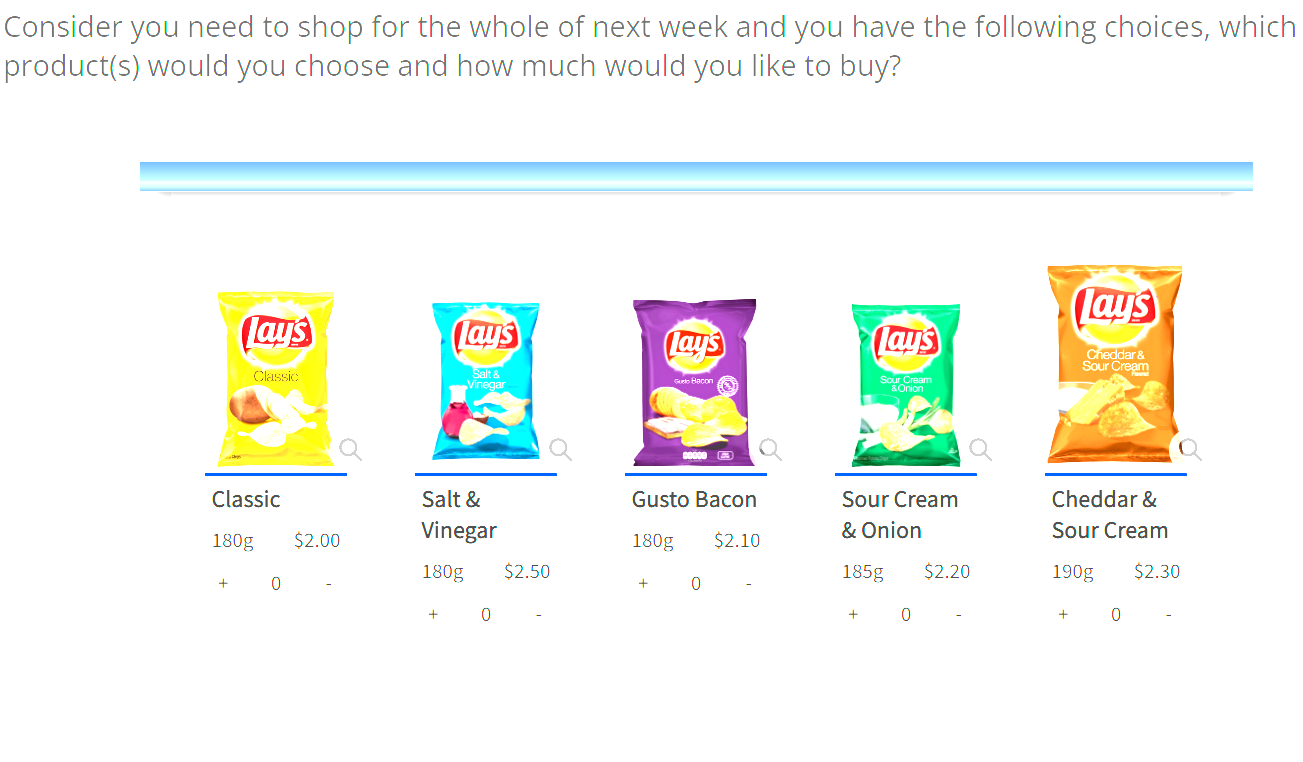
Below is the code for shelf set, update question label, quuestion text, row label, row text, etc. accordingly after copying it.
  <text
   label="ketoolShelfQ"
   size="40">
    <title>Consider you need to shop for the whole of next week and you have the following choices, which product(s) would you choose and how much would you like to buy?</title>
    <group label="g1">Shelf1{@shelfPaddingTop::40px||align::justify@}</group>
    <group label="g2">Shelf2{@align::justify@}</group>
    <group label="g3">Shelf3{@align::justify@}</group>
    <row label="r1" groups="g1">Classic{@imageURL::https://au.focusvision.com/survey/selfserve/560/221003/bank_1.png||largeImageURL::https://au.focusvision.com/survey/selfserve/560/221003/bank_1_L.png||attr_1_label::180g||attr_1_value::$2.00||additionalImage_1_s::https://au.focusvision.com/survey/selfserve/560/221003/bank_1.png||additionalImage_1_l::https://au.focusvision.com/survey/selfserve/560/221003/bank_1_L.png@}</row>
    <row label="r2" groups="g1">Dill{@imageURL::https://au.focusvision.com/survey/selfserve/560/221003/bank_2.png||largeImageURL::https://au.focusvision.com/survey/selfserve/560/221003/bank_2_L.png||attr_1_label::180g||attr_1_value::$2.50||additionalImage_1_s::https://au.focusvision.com/survey/selfserve/560/221003/bank_2.png||additionalImage_1_l::https://au.focusvision.com/survey/selfserve/560/221003/bank_2_L.png@}</row>
    <row label="r3" groups="g1">Paprika{@imageURL::https://au.focusvision.com/survey/selfserve/560/221003/bank_3.png||largeImageURL::https://au.focusvision.com/survey/selfserve/560/221003/bank_3_L.png||attr_1_label::180g||attr_1_value::$2.10||additionalImage_1_s::https://au.focusvision.com/survey/selfserve/560/221003/bank_3.png||additionalImage_1_l::https://au.focusvision.com/survey/selfserve/560/221003/bank_3_L.png@}</row>
    <row label="r4" groups="g1">Seasalt{@imageURL::https://au.focusvision.com/survey/selfserve/560/221003/bank_4.png||largeImageURL::https://au.focusvision.com/survey/selfserve/560/221003/bank_4_L.png||attr_1_label::185g||attr_1_value::$2.20||additionalImage_1_s::https://au.focusvision.com/survey/selfserve/560/221003/bank_4.png||additionalImage_1_l::https://au.focusvision.com/survey/selfserve/560/221003/bank_4_L.png@}</row>
    <row label="r5" groups="g1">Classic{@imageURL::https://au.focusvision.com/survey/selfserve/560/221003/bank_5.png||largeImageURL::https://au.focusvision.com/survey/selfserve/560/221003/bank_2_L.png||attr_1_label::190g||attr_1_value::$2.30||additionalImage_1_s::https://au.focusvision.com/survey/selfserve/560/221003/bank_5.png||additionalImage_1_l::https://au.focusvision.com/survey/selfserve/560/221003/bank_5_L.png@}</row>
    <style name="page.head"><![CDATA[
<style>.answers{display:none;}#btn_continue {visibility: hidden;}</style>
]]></style>
    <style name="question.after"><![CDATA[
<div class="ketool-stage" id ="ketool-stage-${this.label}" style="margin: 0 auto;"></div>
<script type="text/javascript" src="${KEDomain}/core/framework.min.js"></script>

 <style>
  .ketool-stage {
        padding-bottom: 60px;
    }

    div.question ~ div.question {
      padding-top: 0;
      padding-bottom: 0;
    }

    </style>
    <script type="text/javascript">
    if (!ketool.qDefs) ketool.qDefs= {}

    if (!ketool.toolLoader) {
        window.ketool.toolLoader = new ketool.Loader({
          "baseFileURL": "${KEDomain}/core/",
          "scriptDeps": ["fancybox/fancybox.library.js", "https://unpkg.com/ionicons@5.0.0/dist/ionicons/ionicons.js"],
          "cssDeps": ["framework.css", "fancybox/fancybox.library.css", "keBrown.css"],
          "coreFile": "application.min.js",
          "messages": null,
          "platformInterface":
          { "js": "platform_interface/platform_interface.js", "css": "platform_interface/platform_interface.css" }
        });

        ketool.qDefs["${this.label}"]=${jsexport()}
        var isTest = "${gv.isUser() and not gv.debug.respview}" === "True";

        var toolSettings = {
          "toolVersion":"1.0",
          "toolJs": "application.min.js",
          "toolName": "ShelfApp",
          "toolType": "quantity",
          "jsToLoad": [],
          "cssToLoad": ["style.css"],
          "baseToolPath": "${KEDomain}/tools/shelfset/",
          "container": ".ketool-stage",
          "toolCssNames": ["shelfapp-1"],
          "qid": '${this.label}',
          "time_qid": '${this.label}Time',
          "order_qid": '${this.label}Order',
          "imageBaseURL": "empty",
          "minRequired": 1,
          "maxAllowed": 30,
          "maxPerItem": 10,
          "showZoom": true,

          "itemWidth": "120px",
          "exclusiveWidth": '300px',
          "itemMarginLeft": '10px',
          "itemMarginRight": '10px',
          "shelfPaddingTop": "90px",
          "showLabel": true,
          "lazyLoadLargeImg": true,
          "hoverSelection": false,
          "zoomIcon": 'search-sharp',
          "checkIcon": 'checkmark-sharp',
          "crossIcon": 'close-sharp',
          //end standard tool params

          "numDecimalsTimeData": "2",
          "fancyBoxConfig": {},
        };
        //END USER EDITABLE CODE

        ketool.toolLoader.registerSettings(toolSettings, function(info) {
          info.bridge.setPageValidation(function(){
              // console.log("setPageValidation");
              return true;
          });

          info.instance.on("tool_loaded", function(e){
              // console.log("tool_loaded", e);
              if(isTest){
                 ${initKEToggleData()}
             }
          });

          info.instance.on("item_statechange", function(e){
              // console.log("item_statechange", e);
          });

          info.instance.on("tool_resize", function(e){
              // console.log("tool_resize", e);
          });

          info.instance.on("zoom_clicked", function(e){
              // console.log("zoom_clicked", e.detail);
              var clickedShelfZoom = e.detail['shelfItem'];
              var shelfZoomId = clickedShelfZoom.getParam('id');
              var time = e.detail['time'];
              // console.log('time: ', time);
              // punch the first times only! edit if multiple zooms must be stored

               if (!info.bridge.platformInterface.getRowByPrecode([getFormName(4)], shelfZoomId).val) {
                // punch zoom checkbox
                info.bridge.platformInterface.setQuestionAnswer(getFormName(4),shelfZoomId,{val: true});
                // punch zoom time
                info.bridge.platformInterface.setQuestionAnswer(getFormName(5),shelfZoomId,{val: time });
              }

          });

          info.instance.on("tool_error", function(e){
              console.log("tool_error", e);
          });

        });
    }

    $ (document).ready(function () {
      ketool.toolLoader.initLoad();


    });

    </script>
]]></style>
  </text>

  <text
   label="ketoolShelfQTime"
   size="40">
    <title>Hidden: Stores the time taken to each selected item</title>
    <group label="g1">Group 1</group>
    <group label="g2">Group 2</group>
    <group label="g3">Group 3</group>
    <row label="r1" groups="g1">Classic</row>
    <row label="r2" groups="g1">Dill</row>
    <row label="r3" groups="g1">Paprika</row>
    <row label="r4" groups="g1">Seasalt</row>
    <row label="r5" groups="g1">Classic</row>
    <style name="question.after"><![CDATA[
<script type='text/javascript'>
      if (ketool.qDefs) ketool.qDefs["${this.label}"] = ${jsexport()}
    </script>
]]></style>
  </text>

  <text
   label="ketoolShelfQOrder"
   size="40">
    <title>Hidden: Stores the order for each selected item</title>
    <group label="g1">Group 1</group>
    <group label="g2">Group 2</group>
    <group label="g3">Group 3</group>
    <row label="r1" groups="g1">Classic</row>
    <row label="r2" groups="g1">Dill</row>
    <row label="r3" groups="g1">Paprika</row>
    <row label="r4" groups="g1">Seasalt</row>
    <row label="r5" groups="g1">Classic</row>
    <style name="question.after"><![CDATA[
<script type='text/javascript'>
      if (ketool.qDefs) ketool.qDefs["${this.label}"] = ${jsexport()}
    </script>
]]></style>
  </text>

  <checkbox
   label="ketoolShelfQZoom"
   fir="off">
    <title>Hidden: Stores whether the item was zoomed</title>
    <group label="g1">Group 1</group>
    <group label="g2">Group 2</group>
    <group label="g3">Group 3</group>
    <row label="r1" groups="g1">Classic</row>
    <row label="r2" groups="g1">Dill</row>
    <row label="r3" groups="g1">Paprika</row>
    <row label="r4" groups="g1">Seasalt</row>
    <row label="r5" groups="g1">Classic</row>
    <style name="question.after"><![CDATA[
<script type='text/javascript'>
      if (ketool.qDefs) ketool.qDefs["${this.label}"] = ${jsexport()}
    </script>
]]></style>
  </checkbox>

  <text
   label="ketoolShelfQZoomTime"
   size="40">
    <title>Hidden: Stores the time before the item was zoomed</title>
    <group label="g1">Group 1</group>
    <group label="g2">Group 2</group>
    <group label="g3">Group 3</group>
    <row label="r1" groups="g1">Classic</row>
    <row label="r2" groups="g1">Dill</row>
    <row label="r3" groups="g1">Paprika</row>
    <row label="r4" groups="g1">Seasalt</row>
    <row label="r5" groups="g1">Classic</row>
    <style name="question.after"><![CDATA[
<script type='text/javascript'>
      if (ketool.qDefs) ketool.qDefs["${this.label}"] = ${jsexport()}
    </script>
]]></style>
  </text>
General Instructions for all ketool setups
For all ketool setup, please implement the below
<exec when="init">
KEDomain = "https://au.focusvision.com/survey/selfserve/560/221003"
project_id = gv.survey.path

def initKEToggleData():
  returntext = "\n var dataToggler = jQuery('<div>For testing only - click here to expand data capturing nodes to verify the data capture during test mode.</div>');\n"
  returntext += "dataToggler.addClass('dataToggle');\n"
  returntext += "dataToggler.css({'text-decoration': 'underline','font-size': 'small','color': 'blue','cursor': 'pointer','margin-top': '20px'});\n"
  returntext += "jQuery('.ketool-stage').last().after(dataToggler);\n"
  returntext += "dataToggler.click(info.bridge.toggleDataNodes());\n"
  return returntext

def initkelegacyDataToggle():
  if gv.isUser() and not gv.debug.respview:
    output = "<script>\n"
    output += "var dataToggler = jQuery('<div>Please click here to see the data nodes for this tool.</div>');\n"
    output += "dataToggler.addClass('dataToggle');\n"
    output += "dataToggler.css({'text-decoration': 'underline','font-size': 'small','color': 'blue','cursor': 'pointer','margin-top': '20px'});\n"
    output += "dataToggler.click(kelegacyDataToggle);\n"
    output += "function kelegacyDataToggle(){ if(jQuery('.survey-page').hasClass('showkelegacyData')) jQuery('.survey-page').removeClass('showkelegacyData'); else jQuery('.survey-page').addClass('showkelegacyData');  }\n"
    output += "jQuery(function(){jQuery ('.survey-buttons').before(dataToggler); })\n"
    output += "</script>\n"
    output += "<style>.showkelegacyData .answers,.showkelegacyData .question{display: block !important;visibility: visible !important;}</style>\n"
    return output
  else:
    return ""
</exec>
We also have few general options in all ketool setups with function “initKEToggleData” is being called, which should not be changed, these are:
- toolJs: This option contains the name of js file for respective tool
- toolName: This option contains the name of tool
- jsToLoad: This option contains the name(s) of additional js file(s) to load for respective tool
- cssToLoad: This option contains the name(s) of css file for respective tool
- baseToolPath: This option stores the path where any of the above files are stored
- container: This contains the id for calling the div where the tool is rendered
- qid: This stores the current question label to refer
These options are optional and should only be implemented if needed:
- time_qid: This option stores the question label where the time spent on each option (in case it is needed) is stored
- order_qid: This option stores the question label where the order in which an option is answered is stored
- numDecimalsTimeData: This stores the decimal places for the data stored in time spent question
- customValidation: Can be used to specify any custom validation using js
- answerItemConfig: Have the below values which can be used to determine the appearance of the question:
- width: This option stores the width occupied by the question
- numItemsPerRow: Has 3 options below based on screen sizes:
- small: Here we can specify the number if items shown in a row (i.e. horizontally) on small screens (such as few tablets and all phones)
- medium: Here we can specify the number if items shown in a row (i.e. horizontally) on medium screens (such as few tablets and some laptops/desktops with small screen size/resolution)
- large: Here we can specify the number if items shown in a row (i.e. horizontally) on large screens (such as laptops/desktops with large screen size/resolution)
- imageBaseURL: This stores the path for all the images used in the setup (so images can just be called by their name if this is specified
For any follow-up question (including “_time”, “_order” questions) should include the below code:
<exec when="init">
<style name="question.after"><![CDATA[
<script type='text/javascript'>if (ketool.qDefs) ketool.qDefs["${this.label}"] = ${jsexport()};</script>
]]></style>
Shelf Set (#27)
We have the below settings for shelf set tool.
| Tool Settings | Use | Value Type / Syntax | Default Value / Possible Values |
|---|---|---|---|
| toolType | Type of the tool - allowed values are 'single', 'multi', 'quantity', 'ranking' | fixed string | Default value: single
Possible values: ["single","multi","ranking","quantity"] |
| hoverSelection | Hover selection type | boolean | False |
| numDecimalsTimeData | The number of decimal places that the time data should be rounded to. E.g. set to 2 for two decimal places - 2.73. | Number > 0 | 2 |
| minRequired | The minimum required items that need to be selected to show the next button. | Number > 0 | 1 |
| maxAllowed | The maximum number of answers that can be selected | Number > 0 | 1 |
| maxPerItem | The maximum quantity that can be selected per item | Number > 0 | 999 |
| showItemTick | Whether the item tick should be shown | boolean | true |
| itemWidth | Width for the item unless specified in the rowoptions | String (for width in px) | 100px |
| itemMarginLeft | Right margin for the shelfitems | String (for margin in px) | 0px |
| itemMarginRight | Text to insert after all scale labels. | String (for margin in px) | 0px |
| shelfPaddingTop | Top margin for the shelves | String (for padding in px) | 60px |
| exclusiveWidth | Width for the exclusive unless specified in the rowoptions | String (for padding in px) | 100px |
| lazyLoadLargeImg | Whether the tool will wait for large images to be loaded before rendered. If true, it will not wait. Required only when image items are used. | boolean | true |
| showZoom | Zoom on/off. Can be controlled on a row/scale level using row options and scale options | boolean | false |
| zoomIcon | Zoom icon (using ionicons) | String (using ionicons code here) | search-sharp |
| checkIcon | Check icon (using ionicons) | String (using ionicons code here) | checkmark-sharp |
| crossIcon | Cross icon (using ionicons) | String (using ionicons code here) | close-sharp |
| showLabel | Whether the label of the shelf item should be displayed so you can still have the data coded with their labels without actually showing the labels. | boolean | false |
| fancyBoxConfig | Overwriting the default/set by the tool parameters. More information on the possible parameters - https://fancyapps.com/fancybox/3/docs/#options | object |
|
| middleTemplate | Custom HTML template to be used for the middle part of the Shelf item markup. | string |
|
| bottomTemplate | Custom HTML template to be used for the bottom part of the Shelf item markup. | string |
|
| zoomPosition | Position of the zoom button. | fixed string | Default value: bottom-right
Possible values: ["bottom-right","top-right","bottom-left","top-left"] |
| Row Options | Use | Value Type / Syntax | Possible Values / Remarks |
|---|---|---|---|
| width | Custom width to apply to this answer option. | String (for width in px) |
|
| height | Custom height to apply to this answer option. | String (for height in px) |
|
| marginLeft | Custom margin-left to apply to this answer option. | String (for height in px) |
|
| marginRight | Custom margin-right to apply to this answer option. | String (for height in px) |
|
| imageURL | URL for image to be displayed in the answer option cards. | String | Image file URL |
| largeImageURL | URL for the zoom image in the answer option cards. | string | Image file URL |
| showZoom | Whether the zoom should be displayed for that item. | fixed string | Default value: bottom-right
Possible values: ["bottom-right","top-right","bottom-left","top-left"] |
| zoomIcon | Url for the zoom icon for that item. | String (using ionicons code here) | search-sharp |
| zoomPosition | Position for the zoom icon for that item. |
|
|
| checkIcon | Check icon - font-awesome 5.x.x to be used for that item. | String (using ionicons code here) | checkmark-sharp |
| crossIcon | Cross icon - font-awesome 5.x.x to be used for that item. | String (using ionicons code here) | close-sharp |
| disabled | Whether the item should be disabled. Disabled items can still be zoomed if largeImageURL is provided or/and showZoom is enabled | boolean | false |
| showLabel | Whether the title should be displayed for that item if imageURL is specified. | boolean |
|
| maxPerItem | Maximum quantity per item. Only relevent for toolType='quantity'. | Number > 0 |
|
| description | Description to be shown as a caption in the zoom fancybox for that item. | string |
|
| highlighted | Whether the item should be highlighted. | boolean | false |
| attr_N_label | Item attribute label. Will add the attribute label below the item label on the left. You can add multiple label:value PAIRS like - {@attr_1_label::price||attr_2_label::amount||etc...@}. Will not render unless both label and value present for the N attribute | string |
|
| attr_N_value | Item attribute value. Will add the attribute value below the item label on the right. You can add multiple label:value PAIRS like - {@attr_1_value::$5.15||attr_2_value::315g||etc...@}. Will not render unless both label and value present for the N attribute | string |
|
| additionalImage_N_s | Item additional SMALL image source (thumbnail). Will add an additional image in the fancybox setup. You can add multiple _s:_l PAIRS like - {@additionalImage_1_s::SOURCE_TO_SMALL_IMAGE||additionalImage_1_l::SOURCE_TO_LARGE_IMAGE||etc...@}. Will not render unless both _s and _l attributes are present for the N additional image | string |
|
| additionalImage_N_l | Item additional LARGE image source (zoomed image). Will add an additional image in the fancybox setup. You can add multiple _s:_l PAIRS like - {@additionalImage_1_s::SOURCE_TO_SMALL_IMAGE||additionalImage_1_l::SOURCE_TO_LARGE_IMAGE||etc...@}. Will not render unless both _s and _l attributes are present for the N additional image | string |
|
| tickShape | Specify the shape of the selected item tick. You can specify the shape in the tool settings, this will override it for the specified item. | string |
|
| Row Group Options | Use | Value Type / Syntax | Possible Values / Remarks |
|---|---|---|---|
| exclusive | Whether the options inside should be globally exclusive. | boolean |
|
| align | Alignment of the group. Possible values are 'left', 'right', 'justify'. Justify will calculate the available space and add left/right margins to the items to fill in the unused space. | fixed string | Default value: left
Possible values: ["left"," right","justify"] |
| shelfPaddingTop | Shelf padding top for the particular shelf group | string |
|